🔎 마이바티스(MyBatis)란?
👉 자바 객체와 SQL 문장을 매핑해주는 퍼시스턴스 프레임워크
🌈 1. 순서
🌈순서
1. pom.xml 추가 및 application.properties 작성
2. DB 테이블 생성
3. DTO 작성
4. Mapper 인터페이스 & XML 작성
    1) PersonMapper.java
    2) PersonMapper.xml
5. Controller 작성
    1) form : 입력폼 띄우기
    2) insertProc (POST) : 데이터 등록
    3) list (GET) : 목록 조회
    4) content_view (GET) : 상세보기
    5) modify (GET) : 수정폼 띄우기
    6) modify (POST) : 수정 처리
    7) delete (GET) : 삭제 처리
6. View (Thymeleaf 템플릿)
    1) form.html : 신규 데이터 입력
    2) list.html : 전체 목록 출력 + 상세보기 링크
    3) content_view.html : 상세보기 (수정/삭제 링크 포함)
    4) modify.html : 수정폼
🌈 2. 기본 준비
🔽 사용한 sql문
더보기
drop table person;
create table person(
num number primary key,
id varchar2(10),
name varchar2(20),
age number
);

drop sequence person_seq;
create sequence person_seq
start with 1
minvalue 1
increment by 1;

commit;

col id for a10
col name for a10
select * from person;
🔽 application.properties에 작성 -- db연결
spring.datasource.url=jdbc:oracle:thin:@localhost:1521:orcl
spring.datasource.username=sqlid
spring.datasource.password=sqlpw
spring.datasource.driver-class-name=oracle.jdbc.OracleDriver

mybatis.mapper-locations=classpath:mapper/*.xml
🔽 마이바티스 페이지 xml 기본 구문
<?xml version="1.0" encoding="UTF-8" ?>
<!DOCTYPE mapper
  PUBLIC "-//mybatis.org//DTD Mapper 3.0//EN"
  "https://mybatis.org/dtd/mybatis-3-mapper.dtd">
<mapper namespace="org.mybatis.example.BlogMapper">
  <select id="selectBlog" resultType="Blog">
    select * from Blog where id = #{id}
  </select>
</mapper>
🔽 <properties> 아래에 추가
<repositories>
        <repository>
            <id>oracle</id>
            <url>https://repo.maven.apache.org/maven2</url>
        </repository>
</repositories>
🔽 <dependency> 아래에 추가
<dependency>
    <groupId>org.mybatis.spring.boot</groupId>
    <artifactId>mybatis-spring-boot-starter</artifactId>
    <version>3.0.5</version>
</dependency>🌈 3. 전체코드
📁코드 파일 위치 이미지
더보기
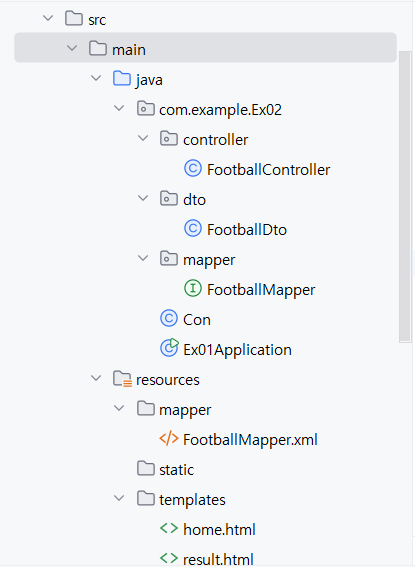
코드 파일 위치 이미지
📁com.example.Ex02
↳ 📁controller (컨트롤러)
- form.html 에서 보낸 name 속성과 PersonDto 의 필드명이 같으니까, 스프링이 자동으로 매핑 (
더보기
package com.example.Ex02.controller;

import com.example.Ex02.mapper.PersonMapper;
import com.example.Ex02.dto.PersonDto;
import org.springframework.beans.factory.annotation.Autowired;
import org.springframework.stereotype.Controller;
import org.springframework.ui.Model;
import org.springframework.web.bind.annotation.GetMapping;
import org.springframework.web.bind.annotation.PostMapping;
import org.springframework.web.bind.annotation.RequestParam;

import java.util.List;

@Controller
public class PersonController {

    // PersonMapper 인터페이스를 Spring 컨테이너에서 자동 주입받음
    @Autowired
    private PersonMapper personMapper;

    // 👉 [C] Create
    @GetMapping(value="/form")
    public String form(){
        return "form";
    }

    // 👉 [C] Create
    // form.html에서 입력한 값 → PersonDto에 자동 바인딩
    @PostMapping(value="/insertProc")
    public String insertProc(PersonDto pDto){
        personMapper.insertPerson(pDto);
        return "redirect:/list"; // list요청 get방식 ==>  목록 페이지로 이동 (재요청)
    }

    // 👉 [R] Read (전체 조회)
    // DB에서 전체 회원 조회 후 list.html로 전달
    @GetMapping(value="/list")
    public String list(Model model){
        List<PersonDto> lists = personMapper.selectAll();
        model.addAttribute("lists", lists); // 모델에 데이터 담기
        return "list";
    }

    // 👉 [R] Read (상세 조회)
    // num 값을 받아 DB에서 단일 회원 조회 후 content_view.html로 전달
    @GetMapping(value = "content_view")
    public String content_view(@RequestParam("num") int num, Model model){
        System.out.println("num :" + num);
        PersonDto pDto = personMapper.findByNum(num);
        model.addAttribute("pDto", pDto);
        return "content_view";
    }

    // 👉 [U] Update
    //  // content_view.html에서 수정한 데이터 전달받아 update 실행
    @PostMapping(value = "/modify")
    public String modify(PersonDto pDto){ // 3가지(num, name, age)
        int cnt = personMapper.updatePerson(pDto);
        System.out.println("cnt "+ cnt);
        return "redirect:/list";  // 수정 후 다시 목록으로 리다이렉트
    }

    // 👉 [D] Delete
    @GetMapping(value = "/delete")
    public String delete(@RequestParam("num")int num){
        int cnt = personMapper.deletePerson(num);
        return "redirect:/list"; // 삭제 후 다시 목록으로 리다이렉트
    }
}
컨트롤러 바인딩
@PostMapping("/insertProc")
public String insertProc(PersonDto pDto) {
    personMapper.insertPerson(pDto);
    return "redirect:/list";
}- 여기서 PersonDto pDto 라고 쓰면,
스프링이 요청 파라미터를 보고 new PersonDto() 객체를 만든 뒤,
setter 메서드를 호출해서 값을 자동으로 채워 넣습니다.
↳ 📁 PersonDto (Dto)
더보기
package com.example.Ex02.dto;

public class PersonDto {
    private int num;
    private String id;
    private String name;
    private int age;

    public PersonDto(){
    }
    public int getNum() {
        return num;
    }
    public void setNum(int num) {
        this.num = num;
    }
    public String getId() {
        return id;
    }
    public void setId(String id) {
        this.id = id;
    }
    public String getName() {
        return name;
    }
    public void setName(String name) {
        this.name = name;
    }
    public int getAge() {
        return age;
    }
    public void setAge(int age) {
        this.age = age;
    }
}
↳ 📁PersonMapper.java (mapper 인터페이스 파일)
- SQL은 없고 메서드 시그니처만 정의 → "메뉴판" 역할
더보기
package com.example.Ex02.mapper;

import com.example.Ex02.dto.PersonDto;
import org.apache.ibatis.annotations.Mapper;

import java.util.List;

@Mapper
public interface PersonMapper {
    void insertPerson(PersonDto person); //  void insertPerson(Dto 임의설정);
    List<PersonDto> selectAll();
    PersonDto findByNum(int x);
    int updatePerson(PersonDto per);
    int deletePerson(int num);

}
🗂️ resources
↳ 📁PersonMapper.xml (mapper sql문 작성)
- SQL이 실제로 적히는 곳 (레시피)
- namespace는 인터페이스 풀경로와 같아야 연결됨
- id는 메서드 이름과 같아야 함
더보기
<?xml version="1.0" encoding="UTF-8" ?>
<!DOCTYPE mapper
        PUBLIC "-//mybatis.org//DTD Mapper 3.0//EN"
        "http://mybatis.org/dtd/mybatis-3-mapper.dtd">

<mapper namespace="com.example.Ex02.mapper.PersonMapper">
    <!--insert-->
    <insert id="insertPerson" parameterType="com.example.Ex02.dto.PersonDto"> <!--PersonDto로 묶어줌-->
        insert into person(num, id, name, age)
        values(person_seq.nextval, #{id}, #{name}, #{age})
    </insert>

    <!--전체조회-->
    <select id="selectAll" resultType="com.example.Ex02.dto.PersonDto"> <!--PersonDto로 묶어줌-->
        select num, id, name, age from person order by num
    </select>

    <!--상세조회-->
    <select id="findByNum" resultType="com.example.Ex02.dto.PersonDto">
        select * from person
        where num = #{num}
    </select>

    <!--수정-->
    <update id="updatePerson" parameterType="com.example.Ex02.dto.PersonDto">
        update person set name=#{name}, age=#{age}
        where num = #{num}
    </update>

    <!--삭제-->
    <delete id="deletePerson" parameterType="com.example.Ex02.dto.PersonDto">
        delete from person where num = #{num}
    </delete>
</mapper>
↳ 📁templates
↳📁 form.html
더보기
<!DOCTYPE html>
<html lang="en">
<head>
    <meta charset="UTF-8">
    <title>회원 입력</title>
</head>
<body>

<form action="/insertProc" method="post">
    <table border="1" width="500">
        <tr>
            <td>아이디</td>
            <td><input type="text" name="id" size="50"></td>
        </tr>
        <tr>
            <td>이름</td>
            <td><input type="text" name="name" size="50"></td>
        </tr>
        <tr>
            <td>나이</td>
            <td><input type="number" name="age" size="50"></td>
        </tr>
        <tr>
            <td colspan="2">
                <input type="submit" value="등록">
                <a href="list">목록보기</a>
            </td>
        </tr>
    </table>
</form>

</body>
</html>
↳📁 list.html
<!DOCTYPE html>
<html lang="en" xmlns:th="http://www.thymeleaf.org">
<head>
    <meta charset="UTF-8">
    <title>list</title>
</head>
<body>
    list.html<br>

    <table border="1">
        <tr>
            <th>번호</th>
            <th>아이디</th>
            <th>이름</th>
            <th>나이</th>
        </tr>

        <th:block th:each="per : ${lists}">
            <tr>
                <td th:text="${per.num}"></td>
                <td th:text="${per.id}"></td>
                <td>
                	// 이름 클릭시 ==> 수정폼
                    <a  th:href="@{'/content_view'(num=${per.num})}" th:text="${per.name}"></a>
                </td>
                <td th:text="${per.age}"></td>
            </tr>
        </th:block>

        <tr>
            <td colspan="4">
                <a href="form">삽입</a> <!--매핑 form 요청-->
            </td>
        </tr>

    </table>
</body>
</html>
↳ 📁 content_view.html
더보기
<!DOCTYPE html>
<html lang="en" xmlns:th="http://www.thymeleaf.org">
<head>
    <meta charset="UTF-8">
    <title>content_view</title>
</head>
<body>
        content_view.html<br>
        <form th:action="@{/modify}" method="post">
            <input type="hidden" name="num" th:value="${pDto.num}"/>
        <table border="1" width="500">
            <tr>
                <td>번호</td>
                <td th:text="${pDto.num}"></td>
            </tr>
            <tr>
                <td>아이디</td>
                <td th:text="${pDto.id}"></td>
            </tr>

            <tr>
                <td>이름</td>
                <td><input type="text" name="name" th:value="${pDto.name}"></td>
            </tr>

            <tr>
                <td>나이</td>
                <td><input type="text" name="age" th:value="${pDto.age}"></td>
            </tr>

            <!--submit-->
            <tr>
                <td colspan="2">
                    <input type="submit" value="수정">

                    <a href="list">목록보기</a>
                    <a th:href="@{/delete(num=${pDto.num})}">삭제</a>
                </td>
            </tr>
        </table>
        </form>
</body>
</html>4. MyBatis 흐름 요약 코드(컨트롤러 → 인터페이스 → XML → SQL 실행)
1. 컨트롤러에서 인터페이스 메서드 호출
personMapper.insertPerson(pDto);
2.인터페이스 (Mapper)
@Mapper
public interface PersonMapper {
    void insertPerson(PersonDto person);  // void insertPerson(Dto 임의설정);
}
- @Mapper 붙이면, MyBatis + 스프링이 이 인터페이스를 스프링 빈으로 등록합니다.
- 실행할 때 personMapper.insertPerson(dto) 를 호출하면,
MyBatis가 **프록시 객체(가짜 구현체)**를 만들어서 대신 실행해줍니다.
3. XML 매퍼 (namespace = 인터페이스 풀경로)
<mapper namespace="com.example.Ex02.mapper.PersonMapper">
    <insert id="insertPerson" parameterType="com.example.Ex02.dto.PersonDto">
        INSERT INTO person(num, id, name, age)
        VALUES (person_seq.nextval, #{id}, #{name}, #{age})
    </insert>
</mapper>- namespace = 인터페이스 풀 패키지 경로 (com.example.Ex02.mapper.PersonMapper)
- <insert id="insertPerson"> = 인터페이스 메서드명
4. 실행
- MyBatis가 컨트롤러에서 받은 insertPerson() 호출을 가로채서
- XML의 <insert id="insertPerson"> SQL을 찾아 실행
- #{id} → pDto.getId() 호출해서 값 바인딩
✅ 정리 (한 줄 요약)
컨트롤러 메서드 호출
➡️ 인터페이스(@Mapper) 메서드
➡️ XML (namespace로 연결, id로 메서드 매칭)
➡️ SQL 실행(DB 반영)
5. UPDATE 작성 순서
1. Mapper XML에 단건 조회 SQL 작성
<select id="findByNum" resultType="PersonDto">
    select * from person where num = #{num}
</select>
2. Mapper 인터페이스에 메서드 선언
PersonDto findByNum(int num);
3. Controller에서 상세보기 메서드 작성
@GetMapping("/content_view")
public String content_view(@RequestParam("num") int num, Model model){
    PersonDto pDto = personMapper.findByNum(num);
    model.addAttribute("pDto", pDto);
    return "content_view";
}
4. content_view.html (수정폼) 작성
- hidden에 num 포함,
- name, age는 input에 출력해 사용자에게 보여줌.
5. Mapper XML에 UPDATE SQL 작성
<update id="updatePerson" parameterType="PersonDto">
    update person set name=#{name}, age=#{age}
    where num=#{num}
</update>
6. Controller에 modify() 작성
@PostMapping("/modify")
public String modify(PersonDto pDto){
    personMapper.updatePerson(pDto);
    return "redirect:/list";
}
🌈 6. Ex07_Football 전체코드 (체크박스 리스트 처리 및 유효성 검정)
📂com.example.Ex02
↳ 📂controller
더보기
package com.example.Ex02.controller;


import com.example.Ex02.dto.FootballDto;
import com.example.Ex02.mapper.FootballMapper;
import jakarta.validation.Valid;
import org.springframework.beans.factory.annotation.Autowired;
import org.springframework.stereotype.Controller;
import org.springframework.ui.Model;
import org.springframework.validation.BindingResult;
import org.springframework.web.bind.annotation.GetMapping;
import org.springframework.web.bind.annotation.ModelAttribute;
import org.springframework.web.bind.annotation.PostMapping;
import org.springframework.web.bind.annotation.RequestParam;

import java.util.List;

@Controller
public class FootballController {

    // FootballMapper라는 도구(인터페이스)를 스프링이 자동으로 가져와서 연결해 준다.
    // 내가 직접 new FootballMapper() 해서 만들 필요 없이,
    // 스프링이 알아서 footballMapper 변수에 준비된 객체를 넣어준다.

    /*인터페이스 풋볼 매퍼 참조변수 (첫글자 소문자 지정)*/
    @Autowired
    private FootballMapper footballMapper;

    @GetMapping(value = "/write")
    public String write(@ModelAttribute("fb") FootballDto FDto){

        return "write";
    }

    // write.html submit 클릭시 (writeProc요청)
    @PostMapping(value = "/writeProc")
    public String proc(@ModelAttribute("fb") @Valid FootballDto fb, BindingResult rs){

        String page="";
        if(rs.hasErrors()){
            return "write";
        }
        footballMapper.insertFootball(fb);
        return "redirect:/list";
        // 리스트[] DB삽입시 ==> 문자열 형태로 바꿔줘야함
        // 예) [미국, 한국]

    }

    // 리스트 조회
    @GetMapping(value = "list")
    public String list(Model model){
        List<FootballDto> lists = footballMapper.selectAll();

        System.out.println(lists.get(0).getRound16());
        System.out.println(lists.get(0).getRound16AsString());

        model.addAttribute("lists",lists);
        return "list";
    }

    // 상세보기 이동
    @GetMapping(value = "content_view")
    public String content_view(@RequestParam("num") int num, Model model){
        FootballDto fDto = footballMapper.findByNum(num);
        model.addAttribute("fDto", fDto);

        return "content_view";
    }

    // 수정폼 이동
    @GetMapping(value = "/modify")
    public String modify(@RequestParam("num") int num, Model model){ // num을 reqeust받고 int num에 담음, model에 담기
        FootballDto fDto = footballMapper.findByNum(num);

        model.addAttribute("fDto", fDto);

        model.addAttribute("nationList", List.of("한국","미국","독일","스페인"));
        model.addAttribute("round16List", List.of("한국","멕시코","독일","브라질", "스위스", "잉글랜드"));
        return "modify";
    }

    //수정 후 목록으로 이동
    @PostMapping(value = "/update")
    public String update(@ModelAttribute("fDto") @Valid FootballDto fDto,BindingResult rs, Model model){
        model.addAttribute("fDto", fDto);

	 	// 라디오
        model.addAttribute("nationList", List.of("한국","미국","독일","스페인"));
        // 체크박스
        model.addAttribute("round16List", List.of("한국","멕시코","독일","브라질", "스위스", "잉글랜드"));

        if(rs.hasErrors()){
            return "modify";
        }
        footballMapper.updateFootball(fDto);

        return "redirect:/list";
    }
    @GetMapping(value = "/delete")
    public String delete(@RequestParam("num") int num){
        footballMapper.deleteFootball(num);
        return "redirect:/list";
    }


}
↳ 📂FootballDto (dto)
더보기
package com.example.Ex02.dto;

import jakarta.validation.constraints.NotBlank;
import jakarta.validation.constraints.NotEmpty;
import jakarta.validation.constraints.Size;

import java.util.Arrays;
import java.util.List;

public class FootballDto {

    private int num;
    @NotBlank(message="id 입력 누락")
    private String id;
    @NotBlank(message="pw 입력 누락")
    private String pw;
    @NotEmpty(message="우승예상국가 입력 누락")
    private String win;
/*    @NotEmpty(message="16강예상국가 입력 누락")*/
    @Size(min=1, message ="16강예상국가 입력 누락" )
    private List<String> round16; // [한국,미국,멕시코]
    /*
    * List<String> [한국,미국,멕시코] 형태론 DB에 삽입이 되지않아 하나씩 뽑아서 삽입
    *
    * xml파일에서 ResultMap으로 작업
    * */


    private String round16AsString; // 한국,미국,멕시코

    public String getRound16AsString() {
        // return round16AsString;
        return (round16 != null) ? String.join(",",round16):null;
    }

    public void setRound16AsString(String round16AsString) {
        // this.round16AsString = round16AsString;
        this.round16 = Arrays.asList(round16AsString.split(","));
        //List<String> round16[브라질, 스위스]
    }

    public int getNum() {
        return num;
    }

    public void setNum(int num) {
        this.num = num;
    }

    public String getId() {
        return id;
    }

    public void setId(String id) {
        this.id = id;
    }

    public String getPw() {
        return pw;
    }

    public void setPw(String pw) {
        this.pw = pw;
    }

    public String getWin() {
        return win;
    }

    public void setWin(String win) {
        this.win = win;
    }

    public List<String> getRound16() {
        return round16;
    }

    public void setRound16(List<String> round16) {
        this.round16 = round16;
    }
}
↳ 📂mapper (FootballMapper.java)
더보기
package com.example.Ex02.mapper;

import com.example.Ex02.dto.FootballDto;
import org.apache.ibatis.annotations.Mapper;

import java.util.List;

@Mapper
public interface FootballMapper {
    void insertFootball(FootballDto fDto); // 입력한 한 묶음 넘기기
    List<FootballDto> selectAll();  // <전체조회> -- List<FootballDto> 리스트 리턴
    FootballDto findByNum(int num); // <상세조회> -- FootballDto객체 리턴
    void updateFootball(FootballDto fDto); // <수정> -- FootballDto fDto 묶음 넘김
    void deleteFootball(int num); // int num 넘김
}
🗂️ resources
↳ 📁FootballMapper.xml (mapper sql문 작성)
더보기
<?xml version="1.0" encoding="UTF-8" ?>
<!DOCTYPE mapper
        PUBLIC "-//mybatis.org//DTD Mapper 3.0//EN"
        "http://mybatis.org/dtd/mybatis-3-mapper.dtd">

<mapper namespace="com.example.Ex02.mapper.FootballMapper">
    <!--resultMap: select할때만 사용 => select 결과만 처리하는 것 (ResulstSet)과 같음-->
    <resultMap id="footballResultMap" type="com.example.Ex02.dto.FootballDto">
        <!--id : 프라이머리 키--> <!--나머지는  result에 작성-->
        <id property="num" column="num"></id>
        <result property="id" column="id"></result>
        <result property="pw" column="pw"></result>
        <result property="win" column="win"></result>
        <result property="round16AsString" column="round16"></result>

    </resultMap>

    <insert id="insertFootball" parameterType="com.example.Ex02.dto.FootballDto">
        insert into football
        values(fb_seq.nextval, #{id}, #{pw}, #{win}, #{round16AsString})
    </insert>

    <select id="selectAll" resultMap="footballResultMap">
        select * from football
        order by num
    </select>

    <select id="findByNum" resultMap="footballResultMap">
        select * from football
        where num = #{num}
        order by num
    </select>

    <update id="updateFootball" parameterType="com.example.Ex02.dto.FootballDto">
        update football set
        pw = #{pw}, win=#{win}, round16=#{round16AsString}
        where num = #{num}
    </update>

    <delete id="deleteFootball" parameterType="com.example.Ex02.dto.FootballDto">
        delete from football where num = #{num}
    </delete>
</mapper>

<!--
    ResultSet rs;
    while(re.next()){
    rs.xxx

    ..


-->
↳ 📁templates
↳📁 write.html (입력폼)
더보기
<!DOCTYPE html>
<html lang="en" xmlns:th="http://www.thymeleaf.org">
<head>
    <meta charset="UTF-8">
    <title>wrtie</title>
</head>

<style>
    .err { color: red; font-size: 12px; }
</style>
<body>
    <h3>입력폼</h3>

    <form th:action="@{/writeProc}" th:object="${fb}" method="post">
    <table border="1">
        <tr>
            <td>아이디</td><td>
            <input type="text" th:field="*{id}">
            <div th:if="${#fields.hasErrors('id')}"
                 th:errors="*{id}" class="err"></div>
        </td>

        </tr>
        <tr>
            <td>비밀번호</td>
            <td><input type="text" th:field="*{pw}">
                <div th:if="${#fields.hasErrors('pw')}"
                     th:errors="*{pw}" class="err"></div>
            </td>
        </tr>

        <tr>
        <td>우승 예상 국가</td>
            <td>
                <input type="radio" th:field="*{win}" value="한국">한국
                <input type="radio" th:field="*{win}" value="미국">미국
                <input type="radio" th:field="*{win}" value="독일">독일
                <input type="radio" th:field="*{win}" value="스페인">스페인
                <div th:if="${#fields.hasErrors('win')}"
                     th:errors="*{win}" class="err"></div>
            </td>

        </tr>

        <tr>
            <td>16강 예상 국가</td>
            <td>
                <input type="checkbox" th:field="*{round16}" value="한국">한국
                <input type="checkbox" th:field="*{round16}" value="멕시코">멕시코
                <input type="checkbox" th:field="*{round16}" value="독일">독일
                <input type="checkbox" th:field="*{round16}" value="브라질">브라질
                <input type="checkbox" th:field="*{round16}" value="스위스">스위스
                <input type="checkbox" th:field="*{round16}" value="잉글랜드">잉글랜드
                <div th:if="${#fields.hasErrors('round16')}"
                     th:errors="*{round16}" class="err"></div>
            </td>

        </tr>

        <tr>
            <td colspan="2">
                <input type="submit" value="입력">
                <a th:href="@{list}"> 목록보기</a>
            </td>
        </tr>

    </table>
    </form>

</body>
</html>
↳📁 list.html (목록)
더보기
<!DOCTYPE html>
<html lang="en" xmlns:th="http://www.thymeleaf.org">
<head>
    <meta charset="UTF-8">
    <title>list</title>
</head>
<body>
    list.html<br>
    <h2>리스트 목록</h2>

    <table border="1">
        <tr>
            <th>번호</th>
            <th>아이디</th>
            <th>비밀번호</th>
            <th>우승 예상국가</th>
            <th>16강 예상국가</th>
        </tr>

        <th:block th:each="fb: ${lists}"> <!--리스트 값 하나씩 받음-->
            <tr>
                <td th:text="${fb.num}"></td>

                <td>
                   <a th:href="@{content_view(num=${fb.num})}" th:text="${fb.id}"></a>
                </td>
                <td th:text="${fb.pw}"></td>

                <td th:text="${fb.win}"></td>
                <td th:text="${fb.round16AsString}"></td>

            </tr>
        </th:block>
        <tr>
            <td colspan="5" style="text-align:center;">
                <a href="write">삽입</a>
            </td>
        </tr>


    </table>
</body>
</html>
↳📁 content_view (상세보기)
더보기
<!DOCTYPE html>
<html lang="en" xmlns:th="http://www.thymeleaf.org">
<head>
    <meta charset="UTF-8">
    <title>content_view</title>
</head>
<body>
        content_view<br>
        <h2>상세보기</h2>

            <table border="1">
                <tr>
                    <td>번호</td>
                    <td th:text="${fDto.num}"></td>
                    </td>

                </tr>
                <tr>
                    <td>아이디</td>
                    <td th:text="${fDto.id}"></td>
                </td>

                </tr>
                <tr>
                    <td>비밀번호</td>
                    <td th:text="${fDto.pw}">

                    </td>
                </tr>

                <tr>
                    <td>우승 예상 국가</td>
                    <td th:text="${fDto.win}"></td>

                </tr>

                <tr>
                    <td>16강 예상 국가</td>
                    <td th:text="${fDto.round16AsString}"></td>

                </tr>

                <tr>
                    <td colspan="2">

                    <!--번호담아서 넘기기-->
                    <!--
                    /modify?num=3
                    /delete?num=3
                    -->
                    <a th:href="@{/modify(num=${fDto.num})}">수정</a> |
                    <a th:href="@{/delete(num=${fDto.num})}">삭제</a> |
                    <a th:href="@{/list}">목록</a>


                </td>
                </tr>

            </table>
        </form>


</body>
</html>
↳📁 modify (수정폼)
더보기
- 수정을 안하는 "아이디"("id")와 수정할 번호("num")은 히든으로 proc에 넘겨주기
<!DOCTYPE html>
<html lang="en" xmlns:th="http://www.thymeleaf.org">
<head>
    <meta charset="UTF-8">
    <title>modify</title>
</head>
<body>
modify<br>
<h2>수정폼</h2>


<form th:action="@{/update}" th:object="${fDto}" method="post">
    <input type="hidden"  th:field="*{num}">
    <input type="hidden"  th:field="*{id}">
    <table border="1">
        <tr>
            <td>아이디</td>
            <td th:text="*{id}"></td>
            </td>

        </tr>
        <tr>
            <td>비밀번호</td>
            <td><input type="text" th:field="*{pw}">
                <div th:if="${#fields.hasErrors('pw')}" th:errors="*{pw}" class="err"></div>
            </td>
        </tr>

        <tr>
            <td>우승 예상 국가</td>
            <td>
<!--                <input type="radio" th:field="*{win}" value="한국">한국
                <input type="radio" th:field="*{win}" value="미국">미국
                <input type="radio" th:field="*{win}" value="독일">독일
                <input type="radio" th:field="*{win}" value="스페인">스페인-->
                <span th:each="nation : ${nationList}">
                        <input type="radio" name="win" th:value="${nation}" th:checked="${fDto.win == nation}">[[${nation}]]
                </span>
                <div th:if="${#fields.hasErrors('win')}"
                     th:errors="*{win}" class="err"></div>
            </td>

        </tr>

        <tr>
            <td>16강 예상 국가</td>
            <td>
<!--             <input type="checkbox" th:field="*{round16}" value="한국">한국
                <input type="checkbox" th:field="*{round16}" value="멕시코">멕시코
                <input type="checkbox" th:field="*{round16}" value="독일">독일
                <input type="checkbox" th:field="*{round16}" value="브라질">브라질
                <input type="checkbox" th:field="*{round16}" value="스위스">스위스
                <input type="checkbox" th:field="*{round16}" value="잉글랜드">잉글랜드-->
                <span th:each="round : ${round16List}">
                    <input type="checkbox" name="round16" th:value="${round}" th:checked="${fDto.round16AsString.contains(round)}">[[${round}]]
                </span>
                <div th:if="${#fields.hasErrors('round16')}"
                     th:errors="*{round16}" class="err"></div>

            </td>

        </tr>

        <tr>
            <td colspan="2" style="text-align:center">
                <input type="submit" value="수정하기">
                <a th:href="@{list}"> 목록보기</a>
            </td>
        </tr>

    </table>
</form>


</body>
</html>
'기초 및 언어 > ▶ Spring' 카테고리의 다른 글
| 08. Spring&Java 어노테이션 정리 (1) | 2025.09.25 |
|---|---|
| 07. Spring_마이바티스(MyBatis) + 페이지 설정 (0) | 2025.09.24 |
| 05. Spring_유효성검사 (0) | 2025.09.21 |
| 04. Spring MVC에서 데이터 전달하기 (1) | 2025.09.19 |
| 03. Spring_Lombok 라이브러리 어노테이션(@Setter, @Getter) (0) | 2025.09.19 |