📘 JSP + JDBC Update 정리
0. select.jsp 에서 "수정" 클릭 → updateForm.jsp?no=2 이동
<td><a href = "updateForm.jsp?no=<%= bb.getNo() %>">수정</a></td>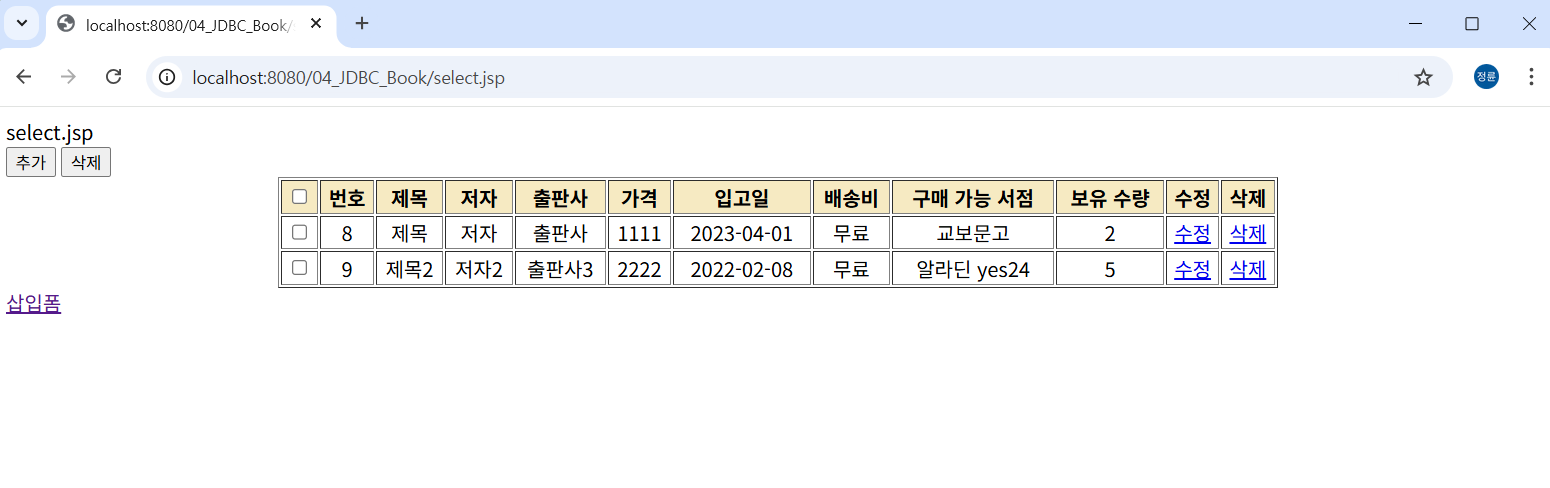
1. updateForm.jsp
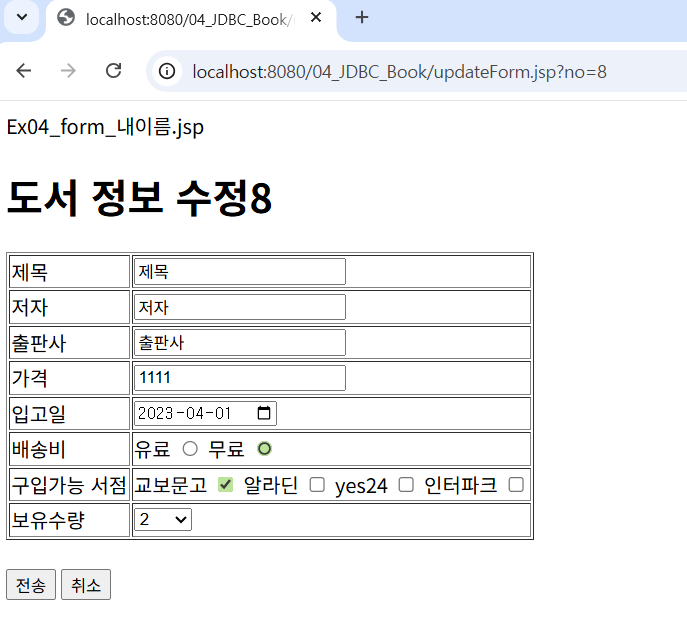
수정할 도서 정보를 보여주고, 사용자가 수정할 수 있도록 입력폼을 제공하는 페이지입니다.
DB에서 기존 데이터를 불러와서 기본값(value) 으로 출력합니다.
<%@ page language="java" contentType="text/html; charset=UTF-8"
	pageEncoding="UTF-8"%>
<%@page import="myPkg.*"%>

<script type="text/javascript" src="js/jquery.js"></script>

<script type="text/javascript">
	function check() {
		if ($('input[name=title]').val() == '') {
			alert("제목을 입력해주세요.");
			$('input[name=title]').focus();
			return false;
		}
		if ($('input[name=author]').val().trim() == "") {
			alert("작가 누락");
			return false;
		}
		if ($('input[name=publisher]').val().trim() == "") {
			alert("출판사 누락");
			return false;
		}
		if ($('input[name=price]').val().trim() == "" || isNaN($('input[name=price]').val())) {
			alert("가격은 숫자로 입력해주세요.");
			return false;
		}
		if ($('input[name=day]').val().trim() == "") {
			alert("입고일 누락");
			return false;
		}
		if ($('input[name=kind]:checked').length == 0) {
			alert("배송비를 선택해주세요.");
			return false;
		}
		if ($('input[name=bookstore]:checked').length == 0) {
			alert("구입 가능 서점을 선택해주세요.");
			return false;
		}
		if ($('select[name=count]').val() == "") {
			alert("수량을 선택하세요.");
			return false;
		}
	}
</script>

<jsp:useBean id="bdao" class="myPkg.BookDao" />
<%
	String[] bookstore = {"교보문고","알라딘","yes24","인터파크"};
	String[] kind = {"유료","무료"};
	String no = request.getParameter("no"); // select.jsp에서 넘어온 번호
	BookBean bb = bdao.getBookByNo(no); // 해당 번호 도서 조회
%>

<h1>도서 정보 수정</h1>
<form name="myform" action="updateProc.jsp" method="post" onsubmit="return check()">
	<!-- 수정할 책 번호 hidden으로 전달 -->
    <input type="hidden" name="no" value="<%= no %>">
	<table border=1>
		<tr>
			<td>제목</td>
			<td><input type="text" name="title" value="<%=bb.getTitle()%>"></td>
		</tr>
		<tr>
			<td>저자</td>
			<td><input type="text" name="author" value="<%=bb.getAuthor()%>"></td>
		</tr>
		<tr>
			<td>출판사</td>
			<td><input type="text" name="publisher" value="<%=bb.getPublisher()%>"></td>
		</tr>
		<tr>
			<td>가격</td>
			<td><input type="text" name="price" value="<%=bb.getPrice()%>"></td>
		</tr>
		<tr>
			<td>입고일</td>
			<td><input type="date" name="day" value="<%=bb.getDay()%>"></td>
		</tr>
		<tr>
			<td>배송비</td>
			<td>
				<% for(String k : kind){ %>
					<%=k%> <input type="radio" name="kind" value="<%=k%>" <% if(bb.getKind().equals(k)) { %> checked <% } %> >
				<% } %>
			</td>
		</tr>
		<tr>
			<td>구입가능 서점</td>
			<td>
				<% for(String bs : bookstore){ %>
					<%=bs%> <input type="checkbox" name="bookstore" value="<%=bs%>"
					<% if(bb.getBookstore().contains(bs)) { %> c
2. updateProc.jsp
폼에서 입력받은 값을 BookBean에 담아 DAO의 updateBook() 호출 → DB 반영.
<%@ page language="java" contentType="text/html; charset=UTF-8"
    pageEncoding="UTF-8"%>
<%
request.setCharacterEncoding("UTF-8");
%>

<jsp:useBean id="bdao" class="myPkg.BookDao" />
<jsp:useBean id="bb" class="myPkg.BookBean" />
<jsp:setProperty name="bb" property="*" />

<%
	// checkbox bookstore 값 처리 (여러개 → 문자열 하나로 합치기)
	String[] bs = request.getParameterValues("bookstore");
	String str = "";
	for(int i=0; i<bs.length; i++){
		str += bs[i] + " ";
	}
	bb.setBookstore(str.trim());

	// DAO 호출
	int cnt = bdao.updateBook(bb);

	if (cnt != -1) {
		response.sendRedirect("select.jsp"); // 성공 → 목록 페이지
	} else {
		response.sendRedirect("updateForm.jsp?no=" + bb.getNo()); // 실패 → 다시 수정폼
	}
%>
3. BookDao.java (update 관련 부분)
	//updateForm에서 no를 받아옴
	public BookBean getBookByNo(String no) {
		getConnection();
		BookBean bb = null;
		try {
			String sql = "select * from book where no= ? " ;
			ps = conn.prepareStatement(sql);

			ps.setInt(1, Integer.parseInt(no));
			rs = ps.executeQuery();

			if(rs.next())  {
				int no2 = rs.getInt("no");
				String title= rs.getString("title");
				String author = rs.getString("author");
				String publisher = rs.getString("publisher");
				int price = rs.getInt("price");
				String day = String.valueOf(rs.getDate("day"));
				String kind = rs.getString("kind");
				String booksotre = rs.getString("bookstore");
				int count = rs.getInt("count");

				bb = new BookBean(no2, title,author,publisher,price,day, kind, booksotre, count);
				// BooBean객체로 묶어서 리턴 --> updateForm으로 리턴
			}
		} catch (SQLException e) {
			e.printStackTrace();
		}finally {
			try {
				if(ps != null)
					ps.close();
				if(rs != null)
					rs.close();
				if(conn != null)
					conn.close();
			} catch(SQLException e) {
				e.printStackTrace();
			}
		}return bb;

	}// getBookByNo


	public int updateBook(BookBean bb) {
		getConnection();

		int cnt = -1;
		String sql =
				"update book set "
						+ "title = ?,"
						+ "author = ?,"
						+ "publisher =?,"
						+ "price =?,"
						+ "day =?,"
						+ "kind =?,"
						+ "bookstore =?,"
						+ "count =?"
						+ " "
						+ "where no = ?";

		try {
			ps = conn.prepareStatement(sql);

			ps.setString(1,bb.getTitle());
			ps.setString(2, bb.getAuthor());
			ps.setString(3, bb.getPublisher());
			ps.setInt(4, bb.getPrice());
			ps.setString(5, bb.getDay());
			ps.setString(6, bb.getKind());
			ps.setString(7, bb.getBookstore());
			ps.setInt(8, bb.getCount());
			ps.setInt(9, bb.getNo());

			cnt = ps.executeUpdate();

		} catch (SQLException e) {
			e.printStackTrace();
		}finally {
			try {
				if(ps != null)
					ps.close();
				if(conn != null)
					conn.close();
			} catch(SQLException e) {
				e.printStackTrace();
			}
		}
		return cnt;
	} // updateBook
🔄 실행 흐름 요약
- select.jsp 에서 "수정" 클릭 → updateForm.jsp?no=2 이동
- updateForm.jsp
- DAO의 getBookByNo(no) 호출
- 해당 번호의 도서정보를 불러와 input value로 세팅
- 사용자가 수정 후 submit → updateProc.jsp 이동
- updateProc.jsp
- BookBean에 값 세팅
- DAO의 updateBook() 실행
- 성공 → select.jsp, 실패 → 다시 updateForm.jsp
- BookDao.updateBook()
- SQL 실행: update book set ... where no=?
- 결과 반환
'기초 및 언어 > ▶ Java&JSP' 카테고리의 다른 글
| 19. JSP + JDBC multiDelete예제 정리2 _ Book (0) | 2025.09.13 |
|---|---|
| 18. JSP + JDBC Delete예제 정리2 _ Book (0) | 2025.09.11 |
| 16. JSP + JDBC insert예제 정리2 _ Book (0) | 2025.09.11 |
| 15. JSP + JDBC Select 예제 정리2 _ Book (0) | 2025.09.11 |
| 14. JSP + JDBC delete예제 정리1 _ member (0) | 2025.09.11 |