1. static
<style type = "text/css">
	.box1, .box2, .box3{
		width : 200px;
		height : 200px;
	}
	.box1{
		/* 꼭짓점에서 20 30 떨어진 자리  */
		border : 3px solid red;
		position :static;
		left : 20px;
		top : 30px;
	}
	.box2{
		border : 3px solid blue;
		position : static;
		left : 100px;
		top : 100px;
	}
	.box3{
		border : 3px solid green;
		position : static;
		left : 200px;
		top : 200px;
	}

</style>


</head>
<body>
	<div class = "box1"></div>
	<div class = "box2"></div>
	<div class = "box3"></div>
</body>
👉 아무 position을 주지 않으면, 모두 static 상태이고 HTML 작성 순서대로 위에서 아래로 쌓입니다.
이게 각 박스의 **“자기 자리”**
2. relative
<style type = "text/css">
	.box1, .box2, .box3{
		width : 200px;
		height : 200px;
	}
	.box1{
		/* 꼭짓점에서 20 30 떨어진 자리  */
		border : 3px solid red;
		position :relative;
		left : 20px;
		top : 30px;
	}
	.box2{
		border : 3px solid blue;
		position : relative;
		left : 100px;
		top : 100px;
	}
	.box3{
		border : 3px solid green;
		position : relative;
		left : 200px;
		top : 200px;
	}

</style>


</head>
<body>
	<div class = "box1"></div>
	<div class = "box2"></div>
	<div class = "box3"></div>
</body>
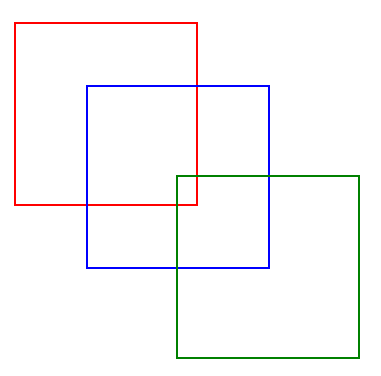
3. absolute
<style type = "text/css">
	.box1, .box2, .box3{
		width : 200px;
		height : 200px;
	}
	.box1{
		/* 꼭짓점에서 20 30 떨어진 자리  */
		border : 3px solid red;
		position :absolute;
		left : 20px;
		top : 30px;
	}
	.box2{
		border : 3px solid blue;
		position : absolute;
		left : 100px;
		top : 100px;
	}
	.box3{
		border : 3px solid green;
		position : absolute;
		left : 200px;
		top : 200px;
	}

</style>

<body>
	<div class = "box1"></div>
	<div class = "box2"></div>
	<div class = "box3"></div>
</body>
✅ 정리
- 자기 자리 = static일 때 차지하는 원래 자리
- relative: 자기 자리 기준으로 이동 (자리 차지 유지)
- absolute: 자기 자리 버리고 부모 기준 이동 (자리 차지 없음)
'기초 및 언어 > ▶ HTML & CSS' 카테고리의 다른 글
| 10. CSS_목록 요소를 가로로 배치하기 (0) | 2025.09.07 |
|---|---|
| 9. CSS_이미지 요소를 세로로 배치하기 (0) | 2025.09.07 |
| 7. CSS_이미지를 문단 옆으로 흐르게 배치 (0) | 2025.09.07 |
| 6. CSS_테이블에 관련된 속성 알아보기 (0) | 2025.09.07 |
| 5. CSS_그림자 효과 만들기 (0) | 2025.09.06 |